
- What Is Salary Slip Format for Small Business and Why It Matters Right Now
- Who This Is For Eligibility or Requirements
- How It Actually Works Complete Process
- Comparison Table Word, PDF and Excel Side by Side
- Real Benefits With Numbers Where Possible
- Mistakes Most People Make and the Fix
- Expert Tips That Actually Work
- Frequently Asked Questions
- Quick Summary Take This Away
- Conclusion
If you need a salary slip format for a small business in India, this guide gives you a clean Word and PDF template structure that works in real HR use. It also shows what to include, what to skip, and how to keep the slip simple without making it look amateur.
The confusing part for most small business owners is that they want a slip that looks official, but they do not want payroll to become complicated. This article clears that up by showing the minimum fields a good slip should have, how to use Word for editing, and when to save the final copy as PDF. It is written for founders, HR interns, and small company owners who want something practical, not decorative.
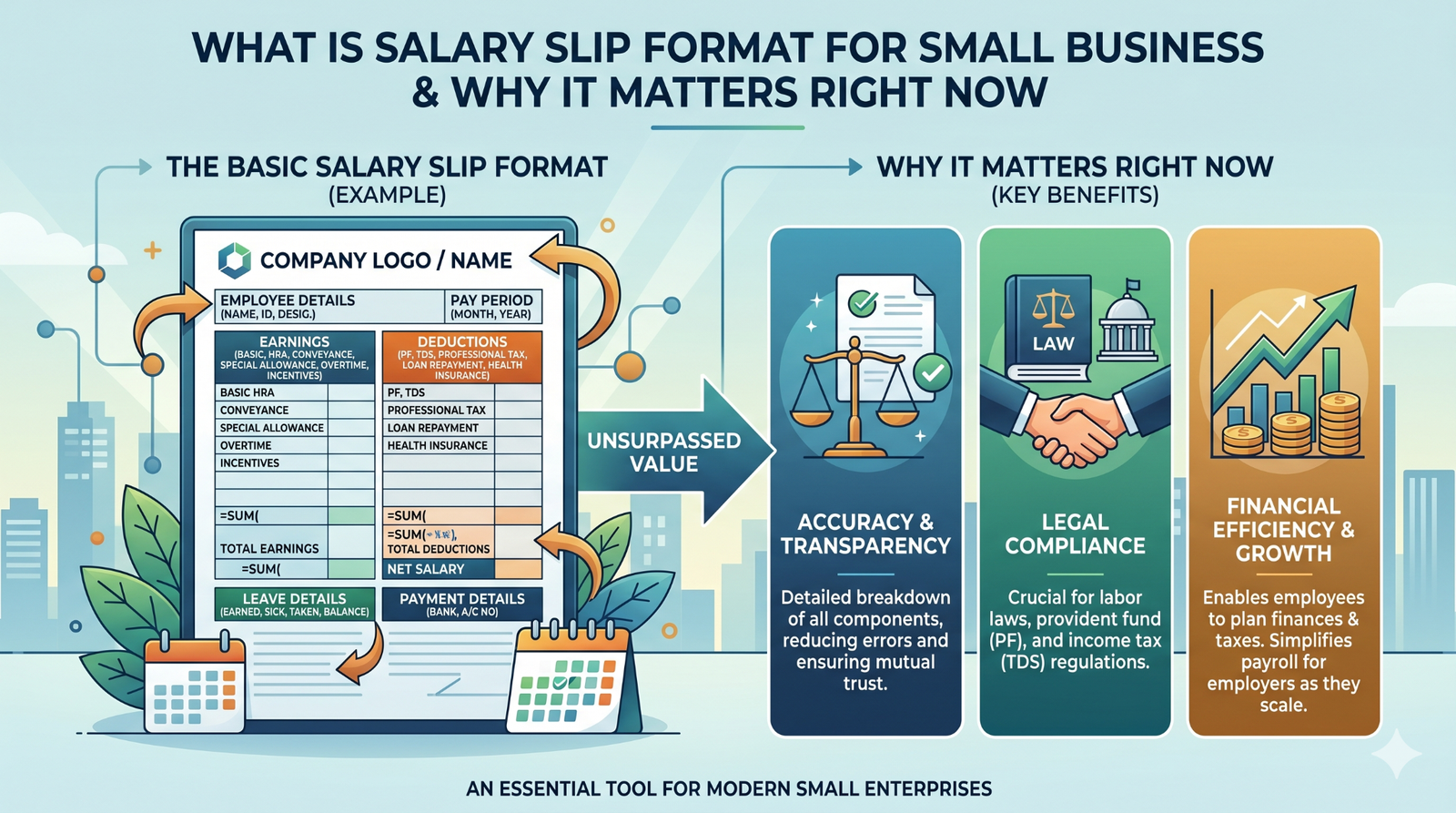
What Is Salary Slip Format for Small Business and Why It Matters Right Now
A salary slip format for a small business is a simple document layout that shows employee earnings, deductions, and net pay in a clear monthly format. In most small Indian companies, it is created in Word first because Word is easy to edit, then saved as PDF for sharing and record keeping.
This matters right now because small businesses often run payroll with limited staff and limited time. They need something that can be updated fast, printed cleanly, and reused every month without rebuilding the entire document. A good salary slip also helps the employee understand what they were paid, which reduces confusion during salary day.
A useful observation from real small-office payroll work is that the best salary slip is usually the one with fewer design tricks. If the slip is easy to read on mobile, easy to print, and easy to explain, it works better than a flashy template that hides the numbers.
Who This Is For Eligibility or Requirements
This format is for small business owners, startup founders, HR assistants, office managers, and interns who handle salary paperwork. It is also useful for employees who want to understand what a proper monthly slip looks like, especially when they are joining their first company.
The most important requirement is a clear earnings and deductions split. If you only write the final salary amount, the slip looks incomplete and causes trouble later when someone asks about PF, tax, leave, or overtime.
Here is who benefits most:
- Small businesses with 1 to 20 employees. They usually need a simple template that is editable and quick to update.
- New startups. They often need a professional-looking slip before they invest in payroll software.
- HR beginners. They need a format that is easy to understand and hard to mess up.
- Employees and freshers. They can use the format to compare their payslip with company policy.
Who should not rely on a basic Word template alone is a business with frequent deductions, multi-state payroll, or a large team. In that case, payroll software is safer because it handles recurring calculations better than manual editing.
How It Actually Works Complete Process
Start with the top section. Add company name, logo, address, month, and year, then place the employee’s name, designation, employee ID, and department below that. This gives the slip identity and makes it feel official, which matters more than many people think when the employee prints it for a bank or rental form.
Next, build the earnings section. Keep it simple with basic salary, HRA, conveyance, special allowance, bonus, or overtime if your business uses those heads. Do not add random fields just to make the slip look full. In practice, too many columns make small business slips harder to edit and easier to break.
Then add deductions. PF, professional tax, TDS, loan recovery, and leave without pay are the most common items in Indian salary slips. If your business does not deduct something, leave that row out instead of adding a zero-filled section that confuses the reader.
After that, calculate gross salary, total deductions, and net salary. Gross salary is the total earnings before deductions, and net salary is what the employee actually receives. This is the part most guides oversimplify, but it is the part that employees check first.
Finally, convert the finished Word file into PDF. That stops accidental editing and keeps the final copy neat when shared by email or WhatsApp. What nobody warns you about here is that PDF is better for the final slip, but Word is better for monthly editing. So keep both versions saved.
Comparison Table Word, PDF and Excel Side by Side
| Name/Option | Key Feature | Best For | Limitation | Verdict |
| Word template | Easy to edit, simple layout, familiar for office work | Small businesses that change salary details manually | No auto-calculation unless you build it carefully | Best for quick editing |
| PDF template | Fixed and professional, hard to change | Final sharing, employee records, bank use | Not ideal for monthly editing | Best for sending the final slip |
| Excel template | Formula-based, easier for calculations | Small businesses with repeated payroll math | Can look less polished than Word | Best for accuracy and reuse |
If your business is very small and you change values by hand, Word is the easiest starting point. If you want repeatable calculations, Excel is better, and if you want a clean final copy, PDF is the version you should share.
Real Benefits With Numbers Where Possible
The biggest benefit of using a proper small-business salary slip format is speed. A ready template can cut monthly formatting work from scratch to just editing names and amounts, which is a big help when one person handles payroll, admin, and HR together. When you actually try this, the time saved feels small in one month but huge across a full year.
Another benefit is fewer mistakes. A structured slip makes it easier to catch missing deductions, wrong net pay, or mismatched salary months before the employee sees the final copy. That matters because a small business often has no separate payroll team to fix errors later.
A third benefit is better trust. Employees feel more confident when they receive a clean slip with clear breakup, because it looks like the company has a proper system behind payroll. That is especially important for younger employees who are seeing their first salary slip and want to understand every line.
One benefit many articles miss is record continuity. When you keep one standard format every month, it becomes easier to compare salary changes, increments, and deductions over time. That makes discussions about salary far less confusing for both the owner and the employee.
Mistakes Most People Make and the Fix
One mistake is using a decorative Word design that looks nice but prints badly. This happens because people focus on appearance before checking spacing and alignment. The result is a slip that looks uneven on paper or on a phone screen. The fix is to keep the header clean, use one font, and test the print preview before saving the final file.
Another mistake is leaving out the month, year, or pay period. People do this when they copy an old template and forget to update the date block. That creates confusion later when someone uses the slip as proof of income. Always update the period first, before you touch the numbers.
A third mistake is putting all deductions into one line. This feels faster, but it makes the slip harder to explain and less useful for the employee. If possible, split PF, PT, TDS, and any recovery into separate rows so the slip shows exactly where the salary went.
A fourth mistake is not keeping salary slips consistent across months. This is something many small businesses are doing right now without realizing it. One month the format is landscape, the next month it is portrait, and the employee cannot compare them easily. Keep one stable format and reuse it every month.
A fifth mistake is skipping a PDF final copy. Word files are easy to edit, which is useful during preparation but risky after approval. Export the final slip as PDF so the version shared with the employee stays fixed.
Expert Tips That Actually Work
Use one master template and duplicate it every month. This sounds basic, but it keeps your payroll process clean and reduces the chance of accidental layout changes.
Keep the company logo small. A huge logo wastes space, pushes the numbers down, and makes the slip harder to scan. A small logo at the top is enough to give the document a professional look.
Add an authorized signatory line at the bottom. In a small business, this gives the slip a more official feel and helps when the document is printed for outside use. It also works well if the founder or office manager signs it manually.
If you are using Word, lock the main layout and only edit the amount fields. That way, the structure stays stable and only the monthly values change. This is one of those small habits that prevents repeated formatting mistakes.
Save both a Word file and a PDF file for every month. The Word version is your working copy, and the PDF version is your final record. When a question comes up later, you will not need to rebuild the slip from scratch.
Test the format with a real employee example, not just fake numbers. The thing that surprises most beginners is that a layout that looks fine with one salary amount can shift badly when a longer name or larger number is added.
Frequently Asked Questions
What is salary slip format for small business India?
It is a simple monthly salary document format used by small companies to show earnings, deductions, and net pay. The format is usually made in Word first because it is easy to edit, then saved as PDF for sharing. It works best when the layout is clean and easy to update every month.
What should be included in a small business salary slip?
A small business salary slip should include company details, employee details, earnings, deductions, gross salary, and net salary. If your business uses PF, professional tax, or TDS, those should be shown separately. The cleaner the breakup, the easier it is for the employee to understand.
Is Word or PDF better for salary slips?
Word is better for editing, and PDF is better for sharing the final copy. Most small businesses prepare the slip in Word and then convert it to PDF for record keeping. That keeps the process simple and professional.
Can I use a simple salary slip format for my startup?
Yes, a simple format is often the best choice for a startup or very small business. You do not need a heavy design if your payroll is basic. What matters most is that the slip shows the right salary breakup and the right month.
How do I make salary slip in Word?
Create sections for company details, employee details, earnings, deductions, and net salary. Then fill in the values and keep the layout neat with borders and consistent spacing. After final editing, save the file as PDF so it cannot be changed by mistake.
Do small businesses need salary slips in India?
Yes, salary slips are important for record keeping and employee communication. They also help with proof of income, salary history, and basic payroll transparency. Even a simple slip is better than no slip at all.
What is the easiest salary slip format for beginners?
The easiest format is a one-page template with only the essential fields: company name, employee name, earnings, deductions, and net salary. Beginners should avoid extra columns until they are confident with the base layout. Simplicity makes the monthly update much easier.
Can I make a salary slip without payroll software?
Yes, small businesses often do this with Word or Excel templates. The main thing is to keep the format consistent and update the figures carefully every month. If payroll gets more complex, software becomes the better option.
Quick Summary Take This Away
A salary slip format for a small business in India should be simple, editable, and easy to share. Word is usually the best place to build the template, while PDF is the best format for the final version. The slip should clearly show company details, employee details, earnings, deductions, and net salary.
The best small-business format is not the most decorated one. It is the one that prints well, is easy to update every month, and does not confuse employees. If your business is still small, a clean Word template can handle the job very well.
Use one master template, test it with a real salary example, and keep both Word and PDF copies saved. That is the simplest way to stay organized without adding unnecessary payroll tools.
Conclusion
A good small-business salary slip helps you look organized, reduces payroll confusion, and gives employees a document they can actually use. It does not need a complicated design to do that well. What it does need is consistency, clear breakup, and a clean final PDF.
For most small businesses, the smartest setup is Word for editing and PDF for sharing. Keep one fixed structure, update the salary values every month, and avoid clutter in the layout. That is enough to make the payroll side feel more professional without making it harder to manage.
Once you build the first clean template, the rest becomes much easier.