
- What Is Salary Slip Format in Excel and Why It Matters Right Now
- Who This Is For Eligibility or Requirements
- How It Actually Works Complete Process
- Comparison Table Salary Slip Options Side by Side
- Real Benefits With Numbers Where Possible
- Mistakes Most People Make and the Fix
- Expert Tips That Actually Work
- Frequently Asked Questions
- Quick Summary Take This Away
- Conclusion
If you searched for salary slip format in Excel free download 2026 India, this guide gives you the exact structure you need, plus the formulas, fields, and mistakes to avoid. It also explains how Indian salary slips work in real HR use, so you can make one that looks professional and actually helps with payroll, tax, and loan paperwork.
Most people get confused by one thing: they think a salary slip is just a pretty sheet with numbers. In practice, it is a monthly record that must show earnings, deductions, and net pay clearly, and in India it is also tied to payroll compliance and employee proof of income. This article is written for Indian employees, freshers, HR trainees, and small business owners who want a clean Excel format without guesswork.
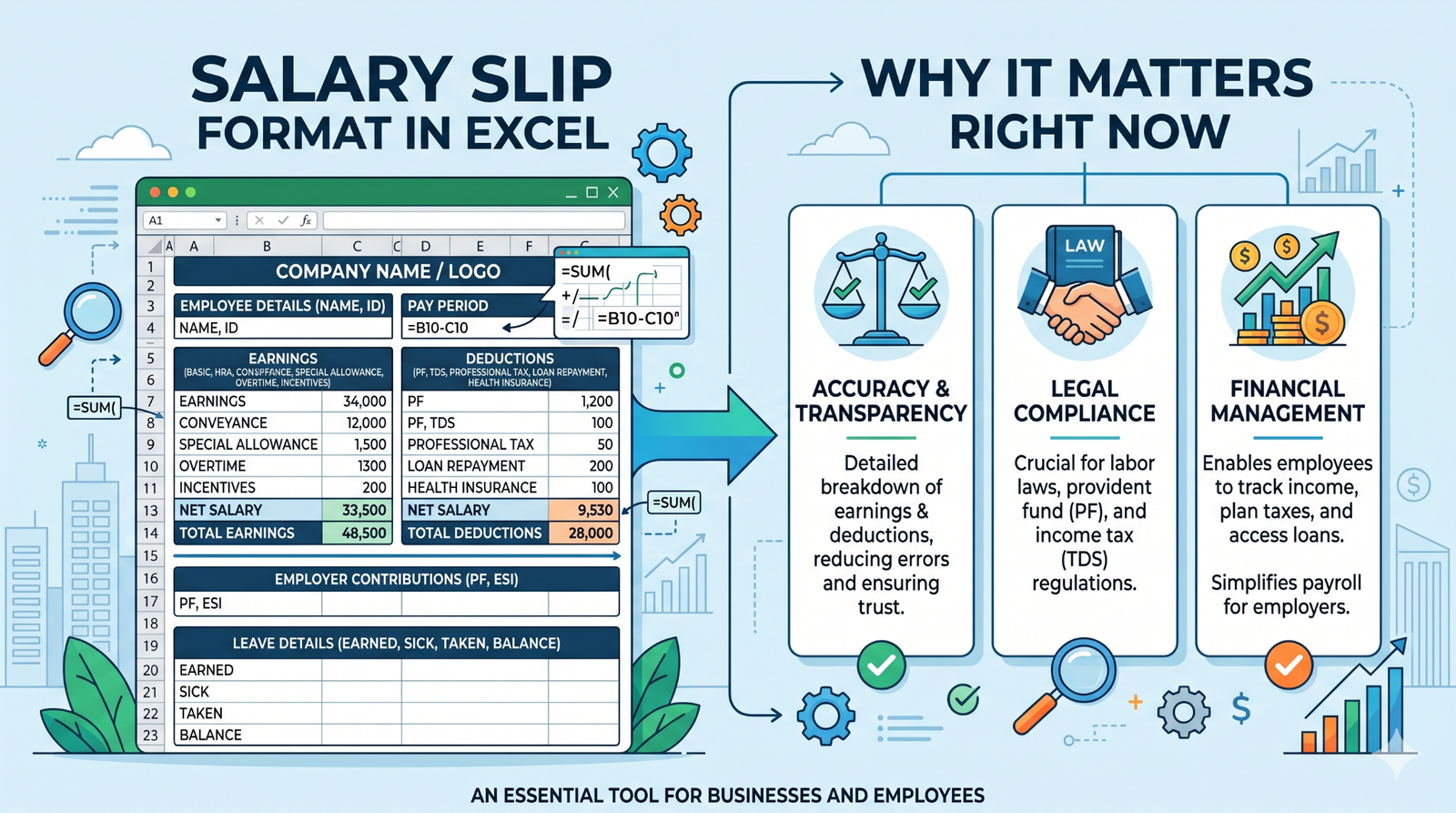
What Is Salary Slip Format in Excel and Why It Matters Right Now
A salary slip format in Excel is a spreadsheet layout used to generate monthly payslips with automatic calculations. You enter employee details, earnings, deductions, and attendance data, and Excel helps you calculate gross salary, total deductions, and take-home pay faster than manual editing.
This matters right now because small businesses, startups, and even growing HR teams want payroll that is quick, editable, and easy to reuse every month. Excel is still one of the most practical tools because it works on almost every office laptop, it is familiar to most people, and it can be customized for private jobs, government-style slips, interns, or contract staff. A good format also reduces payroll mistakes, which is the main reason employees ask HR to resend slips at month-end.
One observation that comes up again and again in HR work is that the same employee often needs three different versions of a salary slip over time: one for joining a company, one for a bank loan, and one for tax filing. That is why a flexible Excel template is more useful than a fixed PDF image.
Who This Is For Eligibility or Requirements
This format is useful for HR interns, payroll staff, founders, accountants, and employees who need to understand or create monthly salary slips. It is also useful for freelancers or small agencies that pay staff manually and want a cleaner record than a plain message or handwritten note.
The most misunderstood requirement is that a salary slip should separate earnings from deductions clearly. If you mix everything into one total, the slip becomes hard to read and can cause problems later when someone checks PF, tax, or bank paperwork.
Here is who should use it most:
- HR and payroll teams. They need a repeatable monthly format that can be copied, edited, and shared quickly.
- Small business owners. They often do not need heavy payroll software at first, so Excel is the easiest starting point.
- Employees and freshers. They can use it to understand what each salary head means and whether deductions look correct.
- Job seekers and finance applicants. A proper payslip helps when submitting proof of income for loans, rentals, or visa-related paperwork.
Who may not need it is a company already using full payroll software with auto-generated slips. Even then, Excel is still useful as a backup format and for testing salary structures before locking the monthly payroll.
How It Actually Works Complete Process
The cleanest Excel salary slip starts with the header. Put company name, logo, address, salary month, employee name, employee ID, designation, department, and joining date at the top. This makes the slip official and helps the reader understand whose salary is shown without searching through the page.
Next, create two main blocks: earnings and deductions. On the earnings side, add basic salary, HRA, special allowance, conveyance, medical allowance, bonus, overtime, or any other approved component. On the deductions side, keep PF, professional tax, ESI if applicable, TDS, leave loss, and any recovery clearly listed.
After that, add formulas for totals. Gross salary should be the sum of all earnings, total deductions should be the sum of all cuts, and net pay should be gross salary minus deductions. In real HR use, this is the part that saves time most months because once the formula is set, you only change the input numbers and the result updates automatically.
Then add attendance data if your payroll depends on leave or LOP days. Include days in month, paid days, leave without pay, and overtime hours if relevant. This is one thing many basic guides skip, but it matters because a salary slip without paid days can look incomplete and can cause disputes when someone questions why the net salary changed.
Finally, format the sheet so it looks readable on print and mobile screens. Use borders, a clean font, consistent currency formatting in rupees, and enough spacing between sections. Most people forget that many employees open their slip on WhatsApp or mobile mail first, so a cramped layout can make a professional slip feel messy.
Comparison Table Salary Slip Options Side by Side
| Name/Option | Key Feature | Best For | Limitation | Verdict |
| Excel salary slip | Editable, formula-based, easy to update every month | HR teams, startups, small businesses | Needs careful setup to avoid formula errors | Best for flexibility and low cost |
| Word salary slip | Clean document style, easy to print | Manual HR use and small offices | Harder to automate calculations | Best for simple official formatting |
| PDF salary slip | Fixed layout, cannot be edited easily | Final employee sharing and records | Not useful for monthly editing | Best for sending the final version |
If you want speed and automation, Excel is the best first choice. If you want a polished final copy, export the finished slip to PDF after checking the numbers.
Real Benefits With Numbers Where Possible
The biggest benefit of an Excel salary slip is time saving. Once the formula sheet is ready, generating a new monthly slip usually takes only a few minutes per employee instead of rebuilding the whole format from scratch. For a small team, that can mean the difference between finishing payroll in one sitting and losing half a day to manual edits.
A second benefit is fewer calculation mistakes. When gross pay, deductions, and net pay are linked with formulas, you reduce the chance of typing the wrong amount in one cell and passing that error into the final slip. That matters more than people think, because one wrong PF or TDS value can trigger follow-up questions from employees right away.
The third benefit is flexibility for Indian payroll rules. You can adapt the same format for private jobs, government-style structures, interns, or contract workers by changing the heads inside the sheet. When you do this properly, you’ll find that one template can serve many salary structures without redesigning the whole document every month.
One benefit many articles leave out is document readiness. A clean Excel slip can be converted into a bank-friendly PDF, archived for audits, and reused as a salary statement template. That makes it useful not just for payroll, but also for compliance support and employee service requests.
Mistakes Most People Make and the Fix
One common mistake is putting only net salary on the slip and skipping the breakdown. People do this because they think the employee only wants the final figure. The problem is that without the full breakup, the slip looks weak and creates questions about tax, PF, and allowances. The fix is simple: always show earnings, deductions, gross salary, and net salary separately.
Another mistake is calculating PF or other deductions from the wrong base. This happens because many beginners copy amounts from old slips without checking whether the structure is private-sector or government-style. The consequence is a slip that looks fine on the surface but does not match payroll logic. To avoid this, lock your formula base before you create the template and keep the deduction logic consistent.
A third mistake is leaving out paid days, leave days, or LOP days. Fresh HR users often focus only on salary heads and forget attendance data. That becomes a problem when someone asks why a salary dropped from one month to the next. Add attendance fields in the same sheet so the salary math is easier to explain later.
A fourth mistake is making the sheet too decorative. This usually happens when someone wants the slip to look “premium” and adds too many colors, merged cells, or uneven spacing. The result is a layout that looks nice in one screenshot but prints badly and is hard to edit. Keep the design clean and readable first.
A fifth mistake is not checking currency format and alignment. Many people leave numbers as plain text, which makes totals harder to verify. Use rupee formatting, consistent decimals if needed, and right alignment for all amount columns so the slip feels professional and easier to audit.
Expert Tips That Actually Work
Start with a master template and duplicate it for each month. This saves time and keeps every slip in the same structure, which is important when you compare one month to the next.
Freeze the top rows if your slip is long. When someone scrolls through a large Excel sheet, the headers disappear fast, and that makes the slip harder to review. A frozen header keeps the company and employee details visible while you check the numbers.
Use separate cells for formula inputs and final outputs. For example, keep basic salary, allowance, and deduction values editable, but lock the formula cells for gross and net pay. This reduces accidental changes, which is one of the most common reasons payroll sheets break.
Add a “remarks” line for special cases like bonus, recovery, or unpaid leave adjustment. Most templates ignore this, but it helps explain one-time changes without confusing the employee. In practice, this one line saves HR time because fewer people ask for a separate explanation.
Create a second hidden sheet for salary structure rules. Store standard percentages, tax assumptions, and company-specific deduction logic there. That way, when the company changes a policy, you update one place instead of editing every employee slip by hand.
Test the template with one dummy employee before using it for real payroll. This sounds basic, but it is the fastest way to catch formula mistakes, broken links, and bad print layout. The thing that surprised many teams is that the best-looking template often fails only when you enter real numbers.
Export the final copy as PDF after checking everything in Excel. Excel is for building and calculating; PDF is for sharing. This one habit makes the slip feel cleaner and keeps the final version from being changed after approval.
Frequently Asked Questions
What is salary slip format in Excel?
It is an Excel sheet built to create monthly payslips with salary details, earnings, deductions, and take-home pay. The main advantage is that formulas can calculate totals automatically. That makes payroll easier to update every month.
How do I make salary slip in Excel?
Create sections for company details, employee details, earnings, deductions, gross salary, and net salary. Then enter formulas for totals so the slip updates itself when values change. A clean layout with borders and clear labels makes it easier to use and print.
What should be included in a salary slip in India?
A typical Indian salary slip includes company name, employee name, pay month, basic salary, HRA, allowances, PF, professional tax, TDS, and net pay. Many slips also include paid days, leave days, and employee ID. These details make the document easier to verify for both HR and the employee.
Is salary slip mandatory in India?
Salary slips are an important payroll record and are expected to be issued regularly to employees. Many employers provide them every month because they are needed for income proof, tax filing, and salary verification. For HR practice, monthly issuance is the safest and most standard approach.
Can I download salary slip format in Excel for free?
Yes, many payroll and HR websites offer free Excel-style salary slip templates. The better approach is to choose one that already includes formulas and editable fields, not just a static design. That saves time and reduces calculation mistakes.
Which is better: Excel or PDF salary slip?
Excel is better for creating and updating the slip because it supports formulas and edits. PDF is better for sending the final approved copy because it looks fixed and professional. Most teams build in Excel and share in PDF.
What is the difference between salary slip and payslip?
In India, both terms usually mean the same thing. They refer to the monthly document that shows salary details, deductions, and net pay. Some companies use “payslip” more often, but the meaning is generally the same.
How do I calculate net salary in Excel?
Use the formula: net salary = gross earnings − total deductions. If you want the sheet to be reliable, keep each deduction in a separate cell and total them before subtracting. That makes the final number easier to check.
Why does my salary slip change every month?
It changes because deductions, attendance, leave, bonuses, and overtime can change from month to month. If paid days or leave without pay are different, the final amount also changes. That is normal in payroll and not always an error.
Quick Summary Take This Away
A salary slip format in Excel is the easiest way to create a monthly payslip that is editable, formula-based, and suitable for Indian payroll use. The best template is one that clearly shows company details, employee details, earnings, deductions, gross pay, and net pay in a clean structure. If you are building one for HR or a small business, the most important thing is not design flair but accuracy and readability.
The comparison is simple: Excel is best for building, Word is fine for basic manual formatting, and PDF is best for sharing the final slip. If you include attendance fields and use formulas carefully, your template will be much easier to reuse each month. Check one dummy slip first, then use the final version for real payroll.
Use Excel to create the template, test the formulas, and export the finished slip as PDF. That one workflow gives you speed, control, and a professional result.
Conclusion
A good salary slip format in Excel does three jobs well: it shows salary clearly, it keeps payroll calculations consistent, and it gives employees a document they can actually use. It also works better than many people expect because Excel is flexible enough for private jobs, startups, and simple HR setups. The real win is not just making a slip faster; it is making it easier to trust.
If you are setting up payroll for the first time, start with one clean template and keep the structure simple. Add formulas, test the sheet with sample data, and save the final copy as PDF after checking every amount. Once that workflow is in place, monthly salary slips become much easier to manage.
You already have the right structure now, so the next step is to build the template and use it consistently.